Balsamiq Mockups, oh, and Pinch too Pinch is a micro-blogging reader for identi.ca on the N900

I like micro-blogging, or well, I hang out on identi.ca anyway. I'd like to use it more but I have trouble keeping track when I add interesting-but-too-prolific people on my subscription list, or I sink when the occasional flamewar/"debate" erupts in a group I follow. I don't write a lot but I read, and I wanted the reading to be more efficient. The way I read identi.ca at the moment is:

  • either through the web page, trying to find back the page where I last read a notice and then coming back slowly to the first page
  • or on XMPP, where if something came up while I was disconnected I can receive a huge heap of messages when coming online even though I may only have a few minutes available to read, and there's no way to mark where I stop if I only read through some of the notices.

Hm... You'd think there's a nice software announcement coming after this but there isn't really. This was the problem I set out to fix a few months ago and here I want to show how I used the wonderful Balsamiq Mockups software to wireframe my interface before jumping into the code (there is code though. You may skip to the end if that's the only thing you care about.)

Balsamiq Mockups

I've been using this for 18 months or so, and I really like it. It enables me to make on screen, in a nice readable way, something I used to scribble on paper before. The end result is something nice to look at that I can work from, and if this is software built for someone else I can show them (without any recoil of horror!) and make sure this is what they have in mind and that I'm not forgetting something glaringly obvious.

Let's go back to the micro-blogging reader. The first thing to handle was the timeline.
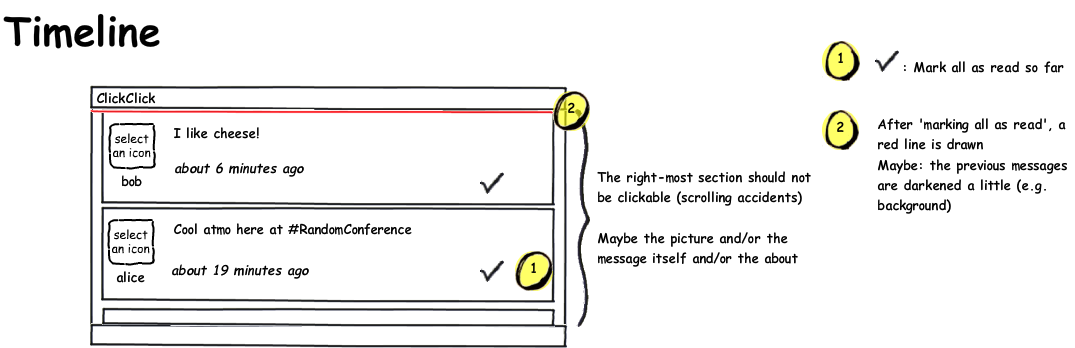
Wireframe of a fake timeline with messages and side-notes

The first time you use Balsamiq -- after the first 5 minutes where you will be amazed and clicking eveywhere (try it, they have a web demo on their site!) -- it will take a bit of time to learn where to find what, and what widgets exist. Soon enough though, you'll be making these nice wireframes about as fast as the crappy hand drawings.

You can have several mockups open in different tabs, which is useful when working on a sequence of screens or different parts of the same project.

As hinted at on that first image, Balsamiq provides widgets both for wireframing, as well as for annotations about the wireframe itself.
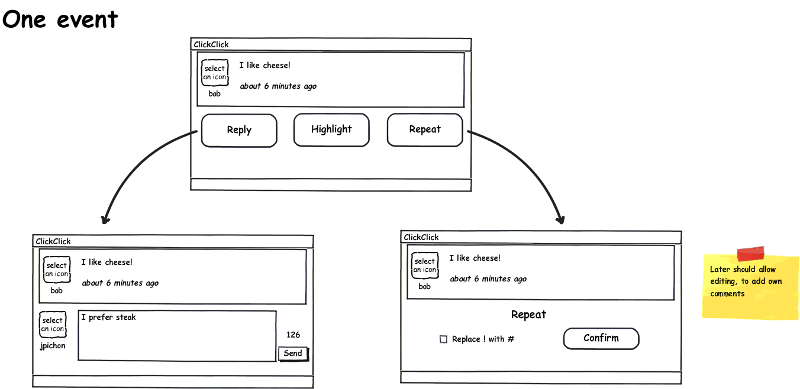
Wireframe of a single event, with the possible actions (reply, highlight, repeat), the follow-up screens and a post-it note

Here I use fancy arrows, and a post-it note. There are other elements like the curly braces from before or the round yellow numbers, to help call attention to differents part of the design. With the different containers and widgets you can easily mock up desktop, web and mobile apps. The font and general feel of the different elements is this way -- a bit unequal, not perfect -- to remind of hand drawing and avoid giving a slick, "finished" impression. It's still easy to make radical changes at this stage of the development, so that's the kind of discussions it should encourage (also, as opposed to say a realistic HTML mock-up, the customer/user is less likely to ask if it'll be done by next week since it looks nearly ready already!)

The third and last mock-up I made for the project was of the menu:
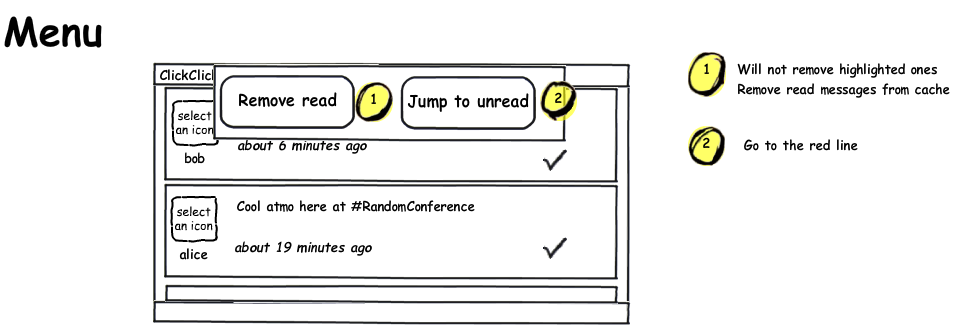
Nice and simple. Go give Balsamiq's web demo a try, you'll see how intuitive the interface is and then you'll remember it when you need it or wish for something similar. It's worth every penny ($79).

Now, what about Pinch, you ask? Well, the first attempt looked like this:
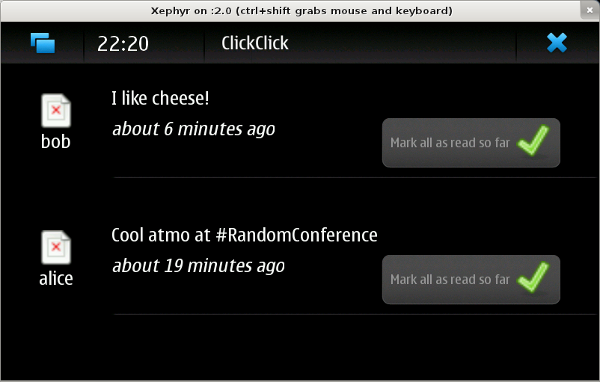
Initial maemo version

The wireframe was a very helpful guideline in remembering my goals and the big picture, to avoid getting lost in the details over and over again, though of course one should feel free to veer away when needed. On a touchscreen, a button with some text is a lot easier to click than just a small icon for instance. Also, the moving red line turned out to be a pain in the butt to figure out in pygtk so messages are simply greyed out and it's just as readable.

By the way, did anyone notice the glaring feature omission in the mockups? If not, maybe you're more of a spectator, like me...! I found out when attending an interesting talk wanting to share some good tidbit and... oops. There's no way to post a brand new message :) Ah well.

Pinch

The app ended up being named pinch due to... a thesaurus really, never mind. At the moment it's really read-only: you get your messages, you mark them as read or highlight the stuff you want to deal with later. You can remove messages you've read. No replying or writing anything though. I still consider it technically usable by other people as my name isn't hard-coded anymore, thus it's possible to set up the app for yourself ;)

The main reason development stalled is that using the app is dead slow and I'm not sure of the best way to deal with it, and I haven't made the time to research how to handle this on a phone. There's a lot of waiting around looking at nothing while the app needs to grab URLs from identi.ca and parse the XML. There are still a lot of interesting problems to solve (and I still need a nice reader-optimised micro-blogging tool dammit), so I should get back to it eventually.

In the spirit of the Myth of the Genius Programmer talk and other people saying the shame of sharing code goes away after a while, I decided to open up my GitHub repo (or perhaps it is happening because I haven't touched the code since June and forgot how terrible, terrible it is).

Resources or tips on making performance improvements for pygtk and/or Maemo apps would be so very welcome, if anyone has recommendations? :)

Leave a comment | 2 so far

Figuring out HCI

I've been reading "The inmates are running the asylum" lately, and wow, is this book blowing my mind. I was amazed straight from the foreword, where the author states that the problems with the current software development process are due to accountancy, and then actually manages to explain it in a way that makes sense. I had never thought about the issues that way. The first chapter starts with examples of terrible software design in modern systems or appliances, and no matter your background you're forced to agree that this is all pretty crap. As a software developer I find myself often squirming in embarrassment at many of those failings, especially as some of them resonate so true to me (e.g. caring about the hierarchical file system when really, users would rather not have to worry about this ever...) This is a book I'm reading slowly to reflect on mistakes made, consider things under new perspectives, and hopefully do better next time.

I'm in a lucky position at my day job, in that in addition to my software development duties I get to interact with our stakeholders and customers. I love the opportunity to understand how my software is used and make it more useful, therefore I keep trying to improve the way I help refine requirements so that both parties end up happy. The book is helping me already by reshaping the way I go through that process. I was, and still am, guilty of figuring out what I'm supposed to do by making lists of features and of tasks to accomplish. Now I try to do this by thinking in terms of interactions, and what information would be helpful for the user to have on-screen. That I discovered Balsamiq's Mockups around the same time is lucky (and I shall write up a review of this awesome piece of software soon), as it's been helping me put together potential UI mockups in seconds instead of minutes -- drag and drop vs. somewhat realistic HTML.

Making and discussing quick mockups before writing the first line of code has been highlighting how, when design emerges only from coding, one is more likely to tweak things a bit to reduce/remove difficulties in the underlying code, and that's exactly the kind of small, mindless decisions that slowly take over a product until you end up with something that's not intuitive, sort of unpleasant to use and that would star brilliantly with all the terrible examples from Chapter 1 of the "inmates" book. It works but it's hard to use and makes the user feel stupid.

Unfortunately things are not just that simple. I've been trying to apply this new process, talking to my users and asking questions slanted toward understanding what sort of interaction they would find most useful and pleasant to use... but it takes a bit more to change a process. No matter what I ask, the answer tends to be, "whatever is fastest for you to build." There's probably a lot of factors mixed up in there. Needing the feature ASAP, dependence on the developers, self-knowledge that they are power users and can learn, awareness of the backlog size, wanting the dev freed up to work on the next feature/defect...

And they might not be wrong. In my fancy mockups from the last session, there are some elements that, now that I've started coding them in, I'm realising are not as simple as they look, and although of course it is possible to add them in, there will be a cost attached to it both in code complexity and time. I see the interaction cost of simply removing the feature ; I see the cost of keeping it in. This is going to be a balancing act rather than a process overhaul, especially since speed of development always matters so much. I still want to get better at making software that's enjoyable to use, though I can't let my productivity drop significantly to do that.

I'm enjoying a lot learning more about HCI. If  anyone has additional resources to recommend, please do share!

Leave a comment | 1 so far

Book review: User Interface Design for Programmers, by Joel Spolsky

I'm interested into learning more about interface design at the moment (still collecting book recommendations!). This book was close-by so I started with it and it works very well as an introduction to the basic concepts (metaphors, affordances, etc) as well as giving real advice on how to design the workflow of an application, what to keep in mind while doing so and some more detailed tips along the way on topics such as colours or the best font to use in forms. As usual Joel's style is pleasant to read, which makes this a very quick read. I definitely recommend this book as an introduction or refresher crash-course on interface design, while keeping in mind that in the end this is still only a high-level view of the whole process. You'll want to read more to answer more detailed questions and concerns about UI and HCI.

Leave a comment